Getting a library card
- When applying for a library card, you are required to provide your name, phone number, address, and ID.
-
Residence Card
(with your recent address on it)
-
Address
(Live, work or attending school in Seoul or Gyeonggi-do)
-
Mobile Phone
(under your name)
- To get a library card you need to sign up online at the following address.
https://splib.or.kr/intro/program/memberJoinIntro.do
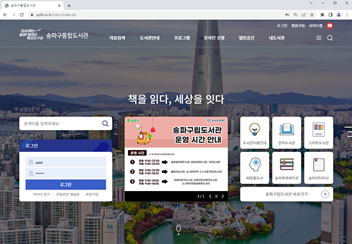
-
Step 1.Select membership type (Ages 14 and older)
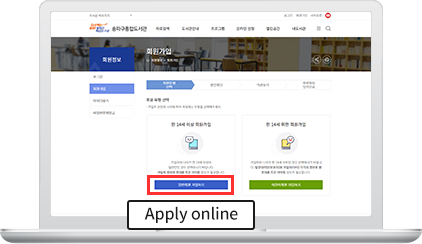
Select 일반회원 가입하기 (Apply online: Ages 14 and older)
-
Step 2.Self-verification by mobile certification
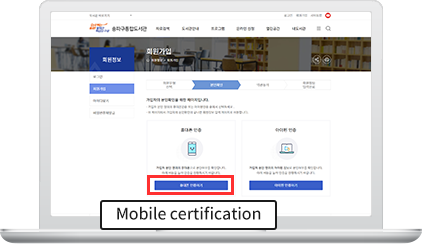
Select 휴대폰 인증하기 (Mobile certification)
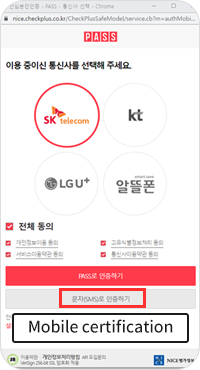
Select the mobile communication company you use.
Select 전체 동의 (Agree all)
Select 문자(SMS)로 인증하기
(Mobile certification by text message) to next step)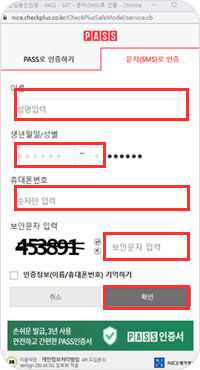
Name (write exactly the same name when you activated your cell phone including upper and lower case letters, hyphen, space, etc.)
First seven-digit of RC number
Mobile number (number only)
Write security code
Select 확인 (confirm) to next step.
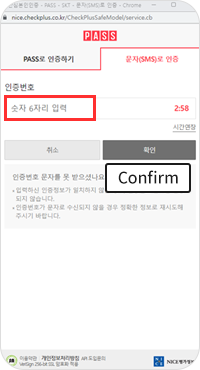
Enter the six-digit authentication code number.
Select 확인 (confirm) to next step.
-
Step 3.Terms and conditions of Agreement
 by submitting this application, you understand and agree to our Terms and conditions.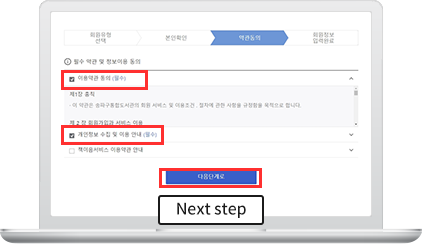
Agree to Terms of Use (Required)
Agree to Personal Information Collection and Usage (Required)
Select 다음단계로 (Next step)
-
Step 4.Entering the personal information
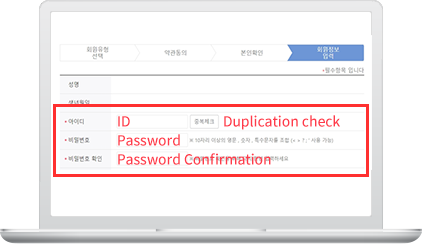
* required fields
ID : Please create your ID and click 중복체크 (Duplication check).
Password : Create your password
*It must be at least 10 characters including numbers, alphabetical and special characters(< > ? ; ’ are available.)
Password confirmation : enter your password again.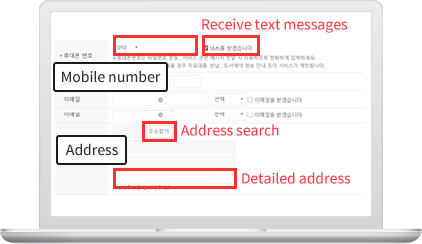
* required fields
Mobile number : Please enter your mobile number.
*Please check the box if you want to receive text messages informing due, book return, or book reservation date.
Address : Click 주소찾기 (Address search) and search your road name address in Korean.
*Please enter detailed address such as APT number.
After signing up online, visit our locations with your Residence Card(with your recent address on it required) to complete the application for a physical library card.

TOP